
Most business owners treat their Google Business Profile like a static business card, missing out on deep data layers that drive actual phone calls. You will learn how to find and exploit the specific local SEO trends and hidden profile features that your competitors are currently ignoring.
On This Page
Conversion tracking beyond the call button
Many local business owners check their monthly performance report and see a number for 'Total Calls' and stop there. This is a mistake because that data only counts people who clicked the call button directly on your profile from a mobile device. It misses every person who looked at your profile, clicked through to your website, and then dialed the number from your header or contact page.
To get a true picture of how your profile generates revenue, you need to use UTM parameters on your website link. By adding a simple tag like '?utm_source=gbp&utm_medium=organic' to your primary URL, you can see exactly how many web sessions and form submissions started with a Google Maps search. A law firm in Chicago might find that while the GBP dashboard reports 20 calls, their website analytics show another 40 leads coming specifically from that map traffic.
When you see the full scale of this data, you can justify spending more time on profile updates. This isn't just about vanity metrics; it is about identifying which specific photos or posts triggered a visit that turned into a consultation. If you know that 30% of your high-value web leads are coming from the map pack, you will prioritize your profile management differently than if you were just guessing.
You should also monitor the 'Request a Quote' button if your category supports it. Even if you prefer phone calls, ignoring these messages signals to Google that you are inactive. Responding within minutes to these digital inquiries often leads to a direct phone conversation as the lead transitions from a text interaction to a verbal booking. Want the full picture? Read our the full guide.
Secondary category selection for niche dominance
Your primary category does 80% of the heavy lifting for your rankings, but the secondary categories are where you pick up the high-intent traffic your competitors miss. A common error is a plumber in Phoenix only selecting 'Plumber' and forgetting 'Drain service' or 'Water heater repair service'. Google uses these secondary tags to surface your business for specific long-tail searches that often have less competition.
Look at your local SEO trends by researching what specialized services are trending in your area. If a roofing company only lists 'Roofing contractor', they are invisible to the homeowner searching specifically for 'Skylight installation'. You should audit your categories every quarter because Google frequently adds new, more granular options that can give you an immediate edge in the map pack.
Be careful not to overstuff your profile with irrelevant categories, as this can dilute your ranking power for your main service. Stick to categories that you actually have a dedicated page for on your website. If you list 'Emergency dental service' as a secondary category, ensuring your website has a page matching that exact intent creates a strong relevancy signal for Google.
The goal is to show up in the 'local finders' for specific problems. When a user searches for something hyper-specific, Google looks for the business that best matches that exact need. By claiming these niche categories, you ensure your phone number appears in front of the customer at the exact moment their specific need arises. Related reading: The Most Common Google Business Profile Mistakes.
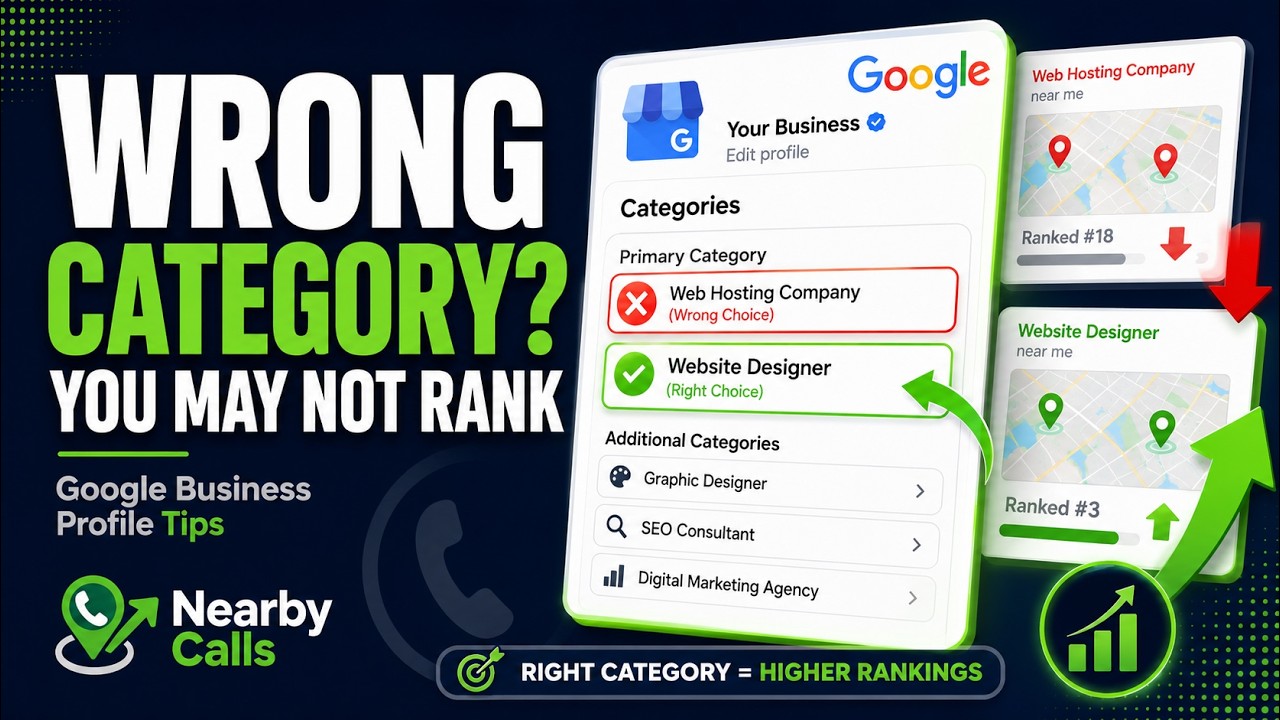
Fix Your Google Business Profile Categories to Rank Higher on Google Maps
Watch on YouTube
Semantic keyword optimization within reviews
Review data is more than just a star rating; it is a source of keywords that Google uses to understand what your business actually does. When a customer writes, 'The HVAC tech fixed my heat pump quickly,' Google associates your profile with 'heat pump repair' in that specific city. Most owners just say 'Thanks for the review,' but you should be guiding this narrative.
You can influence this by asking customers to mention the specific service they received. Instead of asking for a general review, try saying, 'We would love it if you could mention the specific water heater model we installed today.' A dentist with 47 reviews that all mention 'painless cleaning' will outrank a dentist with 100 reviews that just say 'great place'.
Your responses should also reinforce these terms naturally. If a customer compliments your landscaping work, respond with, 'We were happy to help with your sod installation and xeriscaping project in East Austin.' This adds semantic depth to your profile without looking like spam to the algorithm or the reader.
Google's AI is getting better at reading the sentiment and context of these reviews. Profiles that have a high density of specific service-related keywords in their review section are significantly more likely to appear in the 'Justifications' snippet—the bold text in search results that says 'Their website mentions...' or 'Reviewers say...'. These justifications are huge drivers for clicks and calls. Related reading: The Biggest GBP Mistakes We See.
Visual storytelling through user generated content
Your own professional photos are necessary, but user-generated photos often carry more weight for potential customers. Google Maps performance data shows that profiles with a mix of owner-uploaded and customer-uploaded photos see higher engagement rates. A restaurant owner should encourage diners to post photos of the menu and the actual plates, as these raw, unpolished images build trust better than a staged photoshoot.
You can actively manage these overlooked opportunities by 'liking' the best customer photos. This tells Google which images you find most representative of your business, often moving those images higher in the photo gallery. It is a subtle way to curate your visual brand without deleting content that you don't own.
Video is another massive opportunity that most local businesses skip. A 30-second clip of a contractor explaining a complex foundation repair provides more value than five static photos. It keeps users on your profile longer, which is a positive engagement signal. These videos don't need high production values; a simple smartphone walkthrough of your office or a finished project is sufficient.
Keep an eye on the 'Street View' image that Google defaults to for your business. If the Google car drove by while your building was under construction or while a dumpster was out front, that is the first thing people see. You can't always change the Street View, but you can upload a high-quality outside photo of your storefront to try and override that default preview in the search results. Related reading: How Businesses Accidentally Hurt Their Rankings.
Performance analysis of local post types
Google Business Profile posts are often used for generic 'happy holidays' messages that provide zero value. To drive phone calls, you should use 'Offer' posts and 'What's New' posts with specific calls to action. A carpet cleaner who posts a '$20 off your first room' offer with an expiration date creates urgency that a static profile lacks.
Analyze which posts get the most 'Insights' in your dashboard. You might find that posts featuring your team members get twice as many views as posts about your equipment. This data tells you that your local audience wants to see the people behind the business, which builds the comfort level necessary for them to call you for a sensitive job, like home security or childcare.
Don't let your posts expire without a replacement. While posts no longer 'disappear' after seven days in the same way they used to, newer posts get much better placement in the 'Updates' tab. Consistency signals to Google that the business is active. If your latest post is from three years ago, a potential customer might wonder if you are even still in business.
Link your posts to specific landing pages on your site rather than just the homepage. If you are posting about a specific product, link directly to that product page. This reduces the number of clicks a user has to make to get information, which significantly increases the likelihood of them eventually hitting the 'call' button on their screen. If you would rather have this handled for you, Nearby Calls keeps local profiles active, reviewed, and ranking — so the calls come in.
Frequently Asked Questions
Get found, trusted, and called on Google.
Nearby Calls helps local businesses stay active on Google, collect more reviews, and generate more customer calls.
Learn About Nearby Calls